
 About
About FAQ
FAQ Help
Help Map
MapWordDecryptor
- WordDecryptor by Thegrideon Software allows you to reset MS Word document and template (.doc, .dot) passwords with guarantee. The unique feature of this tool is the ability to process any number of Word files simultaneously without any noticeable performance loss.
- It works with all MS Word documents saved with Office 97/2000 Compatible encryption. (.doc files saved from Word 2007-2016 and Word XP/2003 files saved with the default settings).
- You may also check other MS Word tools.
WordDecryptor Features:
- Recovers MS Word document write-protection (write-reservation) passwords instantly.
- Word document decryption technology with guaranteed results.

- Works with the document passwords regardless of the length and complexity.
- Allows simultaneous processing of multiple files.
- Highly optimized code guarantees maximum performance.
- Supports up to 32 simultaneous processing threads (multi-CPU, multi-core and HT).
- Utilizes NVIDIA and AMD GPUs (Graphics Processing Units) for processing acceleration.
- Windows 7 - Windows 10.
- Guaranteed Decryption Service is available.
Program Screenshot:
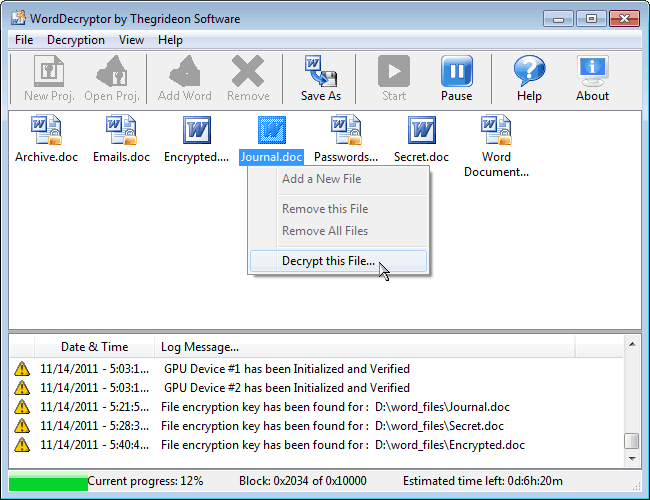
WordDecryptor allows you to reset your documents passwords, but doesn't recover them. Protected *.doc and *.dot files are encrypted with short fixed length encryption keys which are recoverable. These keys allow our tool to decrypt protected documents.
The following tables shows maximum processing time based on several tests with the common laptop and workstation CPUs as well as mid-range GPUs:
| CPU ¹: |
|---|
| Time: |
| Intel Core2 Duo T7500 @ 2.20GHz |
Intel Core i3 2100 @ 3.10GHz |
Intel Core i7 2600 @ 3.40GHz |
|---|---|---|
| up to 3 days | up to 1.5 days | up to 18 hours |
| CPU ¹+ GPU ² |
|---|
| Time: |
| Intel i3 2100 @ 3.10GHz + AMD Radeon HD 6770 |
Intel i3 2100 @ 3.10GHz + NVIDIA GeForce GTX 470 |
Intel Core i3 4130 @ 3.40GHz + AMD Radeon R9 270 |
|---|---|---|
| up to 16 hours | up to 10 hours | up to 8 hours |
¹ The time shown is equal to maximum time necessary to check all "encryption keys" and the key search for most files require just a portion of this time.
² GPU performance is somewhat variable with number of factors including GPU/CPU combination and even driver version. Please contact us if your processing time is noticeable different from data above.
Thegrideon Software has prepared the set of key lookup tables (Rainbow tables) for a default 40-bit encryption with coverage close to 100%. These tables allow us to offer you fast guaranteed decryption service for your MS Word files within minutes for a small per file service fee.
There are two ways you can use our service:
1) You can upload your file to us for decryption.
2) You can employ our service without sending any sensitive information to us: Just open your protected file in WordDecryptor and send us file "Signature" line from the program log for the file you need to have encryption key recovered (or just add all your protected files to WordDecryptor Project file and send this file to us).
Trial version allows you to searches for "encryption keys". File decryption is available in registered version only.
Thegrideon Software and Thegrideon Service are trademarks of Thegrideon Corp. Terms of use | Privacy.
All trademarks, logos, product names & pictures mentioned or displayed herein are the property of their respective holders.