
 About
About FAQ
FAQ Help
Help Map
MapProject Password Recovery
Project Password by Thegrideon Software is an advanced and highly-optimized password recovery tool for MS Project documents (*.mpp) and templates (*.mpt). It works with MS Project files from all versions including the latest Project 2021 You may also check VBA Recovery Toolkit to access VBA Projects source code.
Project Password Recovery Features:
- All MS Project versions are supported.
- Write Protection passwords are recovered or removed instantly.
- All passwords for MS Project files up to the version 2003 are recovered instantly.
- Several password to open search attacks can be queued for Project 2007-2021:

- advanced mixed attacks for precise search range setup:
- multi-position moves to cover modern password policies;
- simple modifications: add part(s) copy, replace chars, etc.
- typing errors, case switching, char substitutions;
- brute-force attacks based on a charset and length selected:
- limit number of equal, capital or special chars or digits;
- dictionary attacks with modifications (several wordlists are included):
- advanced keyboard layouts-aware recovery technique;
- password in reverse, capitalized, uppercased, lowercased;
- number ranges (e.g. 1-31, 01-12, 2013-2020, etc.);
- "Output attacks to a file" option to verify search settings or to generate a new wordlist, etc.
- Highly optimized code (SSE, AVX, AVX2, AVX-512) guarantees best performance.
- Utilizes NVIDIA and AMD Graphics processing units with a high-performance methods.
- Utilizes modern Intel integrated GPUs.
- Supports up to 64 simultaneous processing threads (multi-CPU, multi-GPU).
- Audio, script or web address based post-search notification.
- Windows 7 - Windows 11.
Program Screenshots:

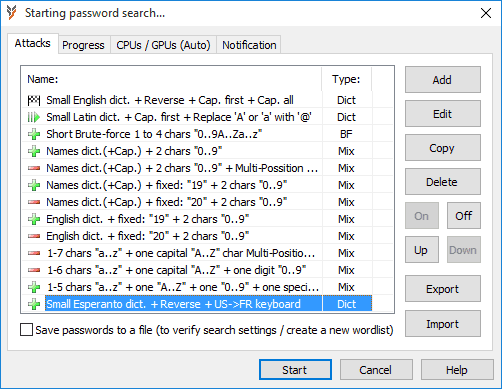
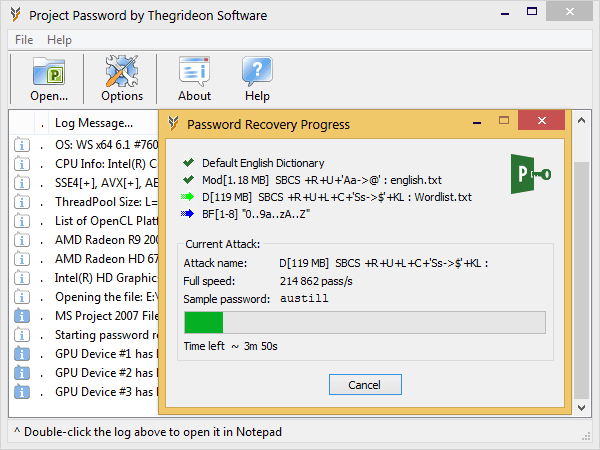
Methods used in MS Project 2007 - 2021 are based on strong cryptographic algorithms (SHA-1, SHA-512, AES) and password recovery cannot be guaranteed in a fixed timeframe. Moreover recovery speed is limited due to iterative methods used in the password verification. In order to recover these types of passwords, candidates have to be created based on wordlists, sequentially with a charset and length selected or as a mix of different parts to exploit known details. Project Password allows you to set several attacks in a queue, setup password patterns from parts with virtually endless number of combinations and precise search range setup. Additional modifications are available including unique keyboard layouts-aware recovery technique, char replacements (e.g. T or t with 7), etc. You may also check Password Search FAQ.
We did our best to enhance this tool performance as well as the recovery speed with some advanced methods and it found to be the fastest tool for MS Project "password to open" recovery. Password recovery speed for very common hardware is available below to back this statement up.
The final password recovery speed is equal to CPUspeed + GPU(1)speed + ... + GPU(N)speed.
For example (Project 2007): Intel i3 + Intel HD 4400 GPU + AMD R9 280X = 10 500 + 4 100 + 250 000 = ~264 000 p/s (passwords per second).
| CPU: |
|---|
| Instructions Set: |
| Project 2007: |
| Project 2010: |
| 2013 - 2021: |
| Intel® Core™2 Duo T7500 @ 2.20GHz |
Intel® Core™ i3 2100 @ 3.10GHz |
Intel® Core™ i3 4130 @ 3.40GHz |
Amazon EC2 "c5.large" Xeon® Platinum core |
|---|---|---|---|
| SSE2 | AVX | AVX2 | AVX512 |
| ~2 300 p/s | ~4 700 p/s | ~10 500 p/s | ~12 500 p/s |
| ~230 p/s | ~475 p/s | ~1 050 p/s | ~1 200 p/s |
| ~30 p/s | ~60 p/s | ~135 p/s | ~210 p/s |
Integrated GPUs
Modern integrated GPUs (like Intel HD and Iris Graphics) can be used for password recovery acceleration. Integrated GPUs are not as powerful as dedicated (discrete) devices and often overlooked but can add up to 30% to CPU performance.
AMD and Nvidia GPUs
Compute units or stream multiprocessors (CU, SM, SMX, SMM) are the main building blocks of GPU calculation power, thus 32xCU GPU card is usually twice as fast as 16xCU GPU card of the same family and architecture running at the same frequency.
The table below shows expected performance per SM / CU for Nvidia and AMD GPUs as well as several actual examples.
| NVIDIA GPU: |
|---|
| Per SM at 1000 MHz |
| Tesla K80 (Kepler 2.0) 2x13xSMX, 820 MHz |
| Tesla V100 (Volta) 80xSM, 1380 Mhz |
| Project 2007: | Project 2010: | 2013 - 2021: |
|---|---|---|
| 10000-15000 p/s | 1000-1500 p/s | 150-200 p/s |
| 270 000 p/s 270000/26/0.82=12600 |
27 000 p/s 27000/26/0.82=1250 |
3 300 p/s 3300/26/0.82=155 |
| 1 200 000 p/s 1200000/80/1.38=10900 |
120 000 p/s 120000/80/1.38=1090 |
18 000 p/s 18000/80/1.38=160 |
| AMD GPU: |
|---|
| Per CU at 1000MHz |
| R9 270 (GCN 1.0) 20xCU, 950 MHz |
| RX 480 (GCN 4.0) 36xCU, 1250 MHz |
| Project 2007: | Project 2010: | 2013 - 2021: |
|---|---|---|
| 7000-7500 p/s | 700-750 p/s | 100-150 p/s |
| 138 000 p/s 138000/20/0.95=7300 |
13 800 p/s 13800/20/0.95=725 |
2 400 p/s 2400/20/0.95=125 |
| 309 000 p/s 309000/36/1.25=6900 |
30 900 p/s 30900/36/1.25=690 |
5 100 p/s 5100/36/1.25=115 |
It is important to mention that AMD and NVIDIA architectures are quite different and although AMD per CU performance is lower, there are more CUs per card in a similar price range. Moreover GPU performance is somewhat variable with number of factors including GPU/CPU combination and even a driver version. Please contact us if your recovery speed is noticeably different from the data above.
Trial version can be used to check format and hardware compatibility. It allows you to setup and test run any password search for up to 15 min per set. Recovered passwords are hidden behind the asterisks.
All trademarks are the property of their respective holders.