
 About
About FAQ
FAQ Help
Help Map
MapAccess Password Recovery
- Access Password by Thegrideon Software is an advanced MS Access password recovery tool.
- It recovers database passwords, user-level security records (logins and passwords), users and groups IDs as well as users and groups structure.
- Access Password allows you to recreate lost workgroup information files (.mdw) to access any user-level secured MS Access database.
- Access Password works with all MS Access (Jet) databases from version 2.0 to 2003.
- How to access user-level security dialogs in MS Access 2007-2024.
- You may also check other MS Access tools.
Access Password Recovery Features:
| Lite | Std. | Pro | |
MS Access database (*.mdb, *.mda, ...) "password to open" recovery  |
|||
| Workgroup information file (*.mdw) accounts / passwords recovery. |
|||
| User and group organization structure recovery from '*.mdw' files. | |||
| Recovers database objects (tables, etc.) Owners and IDs from (*.mdb, ...) if original workgroup information file (*.mdw) is lost. |
|||
| Recovers Users and Groups IDs from '*.mdw'. | |||
| Enumerates database objects (tables, reports, queries, ...) ownership. | |||
| Supports MS Access from version 2.0 (win 3.11) to MS Access 2003. | |||
| Full support for Multilingual and Unicode passwords, names and IDs |
|||
| Windows XP - Windows 11. |
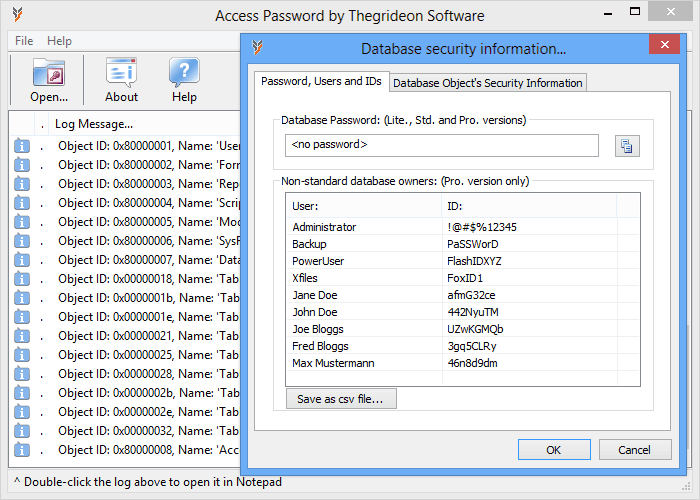
Program Screenshots:
I purchased the Access Password program, which downloaded, installed and worked like a charm. You and your product saved me a $75 and hour support call. Thank you very much. I will recommend you to my co-workers,
Tom Gondesen
Thank you for your help ... it worked like a charm. $30 well invested. I was totally impressed with you email instructions and your timely response. Again, money well invested. Thanks again,
Wes Klassen
Thanks for the info, I have discovered and used the latter process to get the data imported into a new database. And have constructed the reports I needed. Thanks for a grate product, I have already recommended you to two friends,
Robert Campbell
Done and HAPPY!!! The tool is worth every cent. Service is world class! Thank you and have a nice weekend (as I will have one now for sure...) ;-) Kind regards,
Daniel Lisak
Database password "Password Required - Enter database password"
Access Password recovers database passwords in seconds. This tool recovers any password in any encoding: numeric, alpha-numeric, ANSI and Unicode passwords for MS Access from 95 to 2003. Lite, Std and Pro versions.
User-level security accounts "Logon dialogs, Please enter Name and Password"
User-level security in MS Access database is used to assign users different permissions to the same object (tables, reports, queries, etc.). User has to authenticate himself with user name / password pair. Users' accounts are stored in the workgroup information file also known as 'workgroup database' or 'system database': *.mdw, *.mda" (usually 'system.mdw').
With Access Password you can recover user-level security accounts (name / password pairs) from workgroup databases (*.mdw, *.mda, *.sdw) in MS Access versions 2.0 to MS Access 2003. Std and Pro versions.
User IDs or "error 3033, You do not have necessary permissions to..."
If workgroup information file (*.mdw, *.mda) is lost or corrupted, or Admin account doesn't have access to all database elements (or even can't open the database) - you can fix this situation using the fact that you can recover MS Access database objects owners user IDs.
User ID is requested during user account creation and used in user-level model to distinguish users with the same name from different workgroup files (*.mdw, *.mda). You have to use the same user name and the user ID to recreate user account to be able to access database with this account. User-level security data recovery is an easy task for Access Password tool. It is designed to recover user name / ID pairs from any user-level protected database (*.mdb, *.mde, etc...) for all versions of Access: 2.0 to MS Access 2003. Pro version only.
Unicode:
Passwords, user names and user IDs are stored in Unicode since MS Access 2003 and Access Password tool is the only tool allowing Unicode passwords, names and user IDs recovery. This removes all the limits to open MS Access database regardless of protection used. Access Password will help you to open any protected MS Access database.
Trial version allows you to check your files format as well as passwords and IDs recoverability. Recovered passwords are hidden behind the asterisks.
All trademarks are the property of their respective holders.